
单元测试
单元测试概述
单元测试(unit testing)是指对软件中的最小可测试单元进行检查和验证。它是软件测试中的一种基本方法,也是软件开发过程中的一个重要步骤。
单元测试的目的是在于确保软件的每个独立模块都被正确地测试,并且没有潜在的缺陷或漏洞。在单元测试中,需要对每个模块进行测试,以确保它们能够按照预期的方式工作,并且没有任何错误或漏洞。
单元测试通常包括以下几个步骤:
- 确定测试范围:在开始测试之前,需要确定测试的范围,即要测试的功能或模块。
- 编写测试用例:根据确定的测试范围,编写测试用例,这些用例应该覆盖软件中的每个模块。
- 执行测试用例:使用测试工具(如JUnit、TestNG、Mock等)执行测试用例,以确保每个模块都按照预期的方式工作。
- 分析测试结果:在测试完成后,需要分析测试结果,以确定是否存在缺陷或漏洞。
- 修复缺陷或漏洞:如果发现缺陷或漏洞,需要修复它们,以确保软件的质量。
单元测试框架
JUnit
JUnit的重要概念:
| 名称 | 功能作用 |
|---|---|
| Assert | 断言方法集合 |
| TestCase | 表示一个测试案例 |
| TestSuite | 包含一组TestCase,构成一组测试 |
| TestResult | 收集测试结果 |
JUnit的一些注意事项及规范:
(1) 测试方法必须使用@Test 修饰
(2) 测试方法必须使用public void 进行修饰,不能带参数
(3) 测试代码的包应该和被测试代码包结构保持一致
(4) 测试单元中的每个方法必须可以独立测试,方法间不能有任何依赖
(5) 测试类一般使用 Test作为类名的后缀
(6) 测试方法使一般用test 作为方法名的前缀
JUnit失败结果说明:
(1) Failure:测试结果和预期结果不一致导致,表示测试不通过
(2) error:由异常代码引起,它可以产生于测试代码本身的错误,也可以是被测代码的Bug
JUnit内容
(1) 断言的API
| 断言方法 | 断言描述 |
|---|---|
| assertNull(String message, Object object) | 检查对象是否为空,不为空报错 |
| assertNotNull(String message, Object object) | 检查对象是否不为空,为空报错 |
| assertEquals(String message, Object expected, Object actual) | 检查对象值是否相等,不相等报错 |
| assertTrue(String message, boolean condition) | 检查条件是否为真,不为真报错 |
| assertFalse(String message, boolean condition) | 检查条件是否为假,为真报错 |
| assertSame(String message, Object expected, Object actual) | 检查对象引用是否相等,不相等报错 |
| assertNotSame(String message, Object unexpected, Object actual) | 检查对象引用是否不等,相等报错 |
| assertArrayEquals(String message, Object[] expecteds, Object[] actuals) | 检查数组值是否相等,遍历比较,不相等报错 |
| assertArrayEquals(String message, Object[] expecteds, Object[] actuals) | 检查数组值是否相等,遍历比较,不相等报错 |
| assertThat(String reason, T actual, Matcher<? super T> matcher) | 检查对象是否满足给定规则,不满足报错 |
(2) JUnit常用注解:
1) @Test: 定义一个测试方法 @Test(excepted=xx.class): xx.class 表示异常类,表示测试的方法抛出此异常时,认为是正常的测试通过的 @Test(timeout = 毫秒数) :测试方法执行时间是否符合预期。
2) @BeforeClass: 在所有的方法执行前被执行,static 方法全局只会执行一次,而且第一个运行。
3) @AfterClass:在所有的方法执行之后进行执行,static 方法全局只会执行一次,最后一个运行。
4) @Before:在每一个测试方法被运行前执行一次。
5) @After:在每一个测试方法运行后被执行一次。
6) @Ignore:所修饰的测试方法会被测试运行器忽略。
7) @RunWith:可以更改测试执行器使用junit测试执行器。
JUnit使用
Controller层单元测试
(1) Springboot中使用maven引入Junit非常简单, 使用如下依赖即可引入:
<dependency>
    <groupId>org.springframework.boot</groupId>
    <artifactId>spring-boot-starter-test</artifactId>
    <scope>test</scope>
</dependency>
(2) 代码入下:
@RunWith(SpringRunner.class)
@SpringBootTest(classes = MainApplication.class)
public class StudentControllerTest {

	// 注入Spring容器
    @Autowired
    private WebApplicationContext applicationContext;
    // 模拟Http请求
    private MockMvc mockMvc;

    @Before
    public void setupMockMvc(){
    	// 初始化MockMvc对象
        mockMvc = MockMvcBuilders.webAppContextSetup(applicationContext).build();
    }

    /**
     * 新增学生测试用例
     * @throws Exception
     */
    @Test
    public void addStudent() throws Exception{
        String json="{"name":"张三","className":"三年级一班","age":"20","sex":"男"}";
        mockMvc.perform(MockMvcRequestBuilders.post("/student/save")    //构造一个post请求
                    // 发送端和接收端数据格式
                    .contentType(MediaType.APPLICATION_JSON_UTF8)
                    .accept(MediaType.APPLICATION_JSON_UTF8)
                    .content(json.getBytes())
            )
           // 断言校验返回的code编码
           .andExpect(MockMvcResultMatchers.status().isOk())
           // 添加处理器打印返回结果
           .andDo(MockMvcResultHandlers.print());
    }
}
只需要在类或者指定方法上右键执行即可,可以直接充当postman工作访问指定url,且不需要写请求代码,这些都由工具自动完成。
(3)案例中相关组件介绍
本案例中构造mockMVC对象时,也可以使用如下方式:
@Autowired
private StudentController studentController;
@Before
public void setupMockMvc(){
   // 初始化MockMvc对象
   mockMvc = MockMvcBuilders.standaloneSetup(studentController).build();
}
其中MockMVC是Spring测试框架提供的用于REST请求的工具,是对Http请求的模拟,无需启动整个模块就可以对Controller层进行调用,速度快且不依赖网络环境。
使用MockMVC的基本步骤如下:
- mockMvc.perform执行请求
- MockMvcRequestBuilders.post或get构造请求
- MockHttpServletRequestBuilder.param或content添加请求参数
- MockMvcRequestBuilders.contentType添加请求类型
- MockMvcRequestBuilders.accept添加响应类型
- ResultActions.andExpect添加结果断言
- ResultActions.andDo添加返回结果后置处理
- ResultActions.andReturn执行完成后返回相应结果
Service层单元测试
可以编写如下代码对Service层查询方法进行单测:
@RunWith(SpringRunner.class)
@SpringBootTest
public class StudentServiceTest {

	@Autowired
    private StudentService studentService;

    @Test
    public void getOne() throws Exception {
    	 Student stu = studentService.selectByKey(5);
         Assert.assertThat(stu.getName(),CoreMatchers.is("张三"));
    }
}
Dao层单元测试
可以编写如下代码对Dao层保存方法进行单测:
@RunWith(SpringRunner.class)
@SpringBootTest
public class StudentDaoTest {

	@Autowired
    private StudentMapper studentMapper;

    @Test
    @Rollback(value = true)
    @Transactional
    public void insertOne() throws Exception {
    	 Student student = new Student();
    	 student.setName("李四");
    	 student.setMajor("计算机学院");
    	 student.setAge(25);
    	 student.setSex('男');
    	 int count = studentMapper.insert(student);
    	 Assert.assertEquals(1, count);
    }
}
其中@Rollback(value = true) 可以执行单元测试之后回滚所新增的数据,保持数据库不产生脏数据。
idea中查看单元测试覆盖率
(1) 单测覆盖率
测试覆盖率是衡量测试过程工作本身的有效性,提升测试效率和减少程序bug,提升产品可靠性与稳定性的指标。
统计单元测试覆盖率的意义:
1) 可以洞察整个代码中的基础组件功能的所有盲点,发现相关问题。
2) 提高代码质量,通常覆盖率低表示代码质量也不会太高,因为单测不通过本来就映射出考虑到各种情况不够充分。
3) 从覆盖率的达标上可以提高代码的设计能力。
(2) 在idea中查看单元测试覆盖率很简单,只需按照图中示例的图标运行,或者在单元测试方法或类上右键Run 'xxx' with Coverage即可。执行结果是一个表格,列出了类、方法、行数、分支覆盖情况。
(3) 在代码中会标识出覆盖情况,绿色的是已覆盖的,红色的是未覆盖的。
(4) 如果想要导出单元测试的覆盖率结果,可以使用如下图所示的方式,勾选 Open generated HTML in browser
单元测试工具-Mockito
Mockito简介
在单元测试过程中主张不要依赖特定的接口与数据来源,此时就涉及到对相关数据的模拟,比如Http和JDBC的返回结果等,可以使用虚拟对象即Mock对象进行模拟,使得单元测试不在耦合。也即更方便的构建数据,可以让中间的方法返回你指定的数据(Mock对象),让测试通过。
Mock过程的使用前提:
(1) 实际对象时很难被构造出来的
(2) 实际对象的特定行为很难被触发
(3) 实际对象可能当前还不存在,比如依赖的接口还没有开发完成等等。
Mockito官网:https://site.mockito.org 。Mockito和JUnit一样是专门针对Java语言的mock数据框架,它与同类的EasyMock和jMock功能非常相似,但是该工具更加简单易用。
Mockito的特点:
(1) 可以模拟类不仅仅是接口
(2) 通过注解方式简单易懂
(3) 支持顺序验证
(4) 具备参数匹配器
Mockito使用
maven引入spring-boot-starter-test会自动将mockito引入到工程中。
使用案例
(1) 在之前的代码中在定义一个BookService接口, 含义是借书接口,暂且不做实现
public interface BookService {
    Book orderBook(String name);
}
(2) 在之前的StudentService类中新增一个orderBook方法,含义是学生预定书籍方法,其中实现内容调用上述的BookService的orderBook方法。
public Book orderBook(String name) {
   return bookService.orderBook(name);
}
(3) 编写单元测试方法,测试StudentService的orderBook方法,注意需要是Mockito对象(也即加@Mock注解)才能在when里调用,普通对象不行
@Test
public void orderBookTest() {
    Book expectBook = new Book(1L, "钢铁是怎样炼成的", "书架A01");
    Mockito.when(bookService.orderBook(any(String.class))).thenReturn(expectBook);
    Book book = studentService.orderBook("");
    System.out.println(book);
    Assert.assertTrue("预定书籍不符", expectBook.equals(book));
}
(4) 执行结果:
(5) 结果解析
上述内容并没有实现BookService接口的orderBook(String name)方法。但是使用mockito进行模拟数据之后,却通过了单元测试,原因就在于Mockito替换了本来要在StudentService的orderBook方法中获取的对象,此处就模拟了该对象很难获取或当前无法获取到,用模拟数据进行替代。
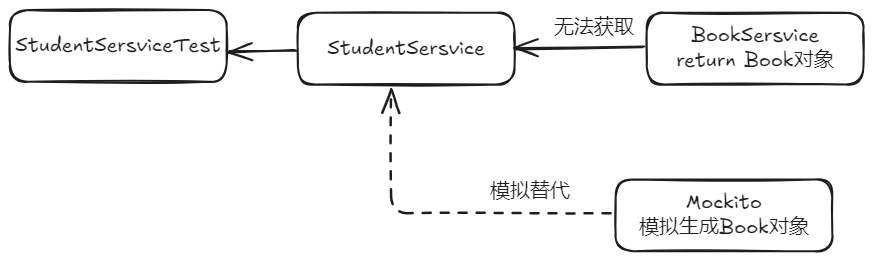
相关语法
常用API:
上述案例中用到了mockito的when、any、theWhen等语法。接下来介绍下都有哪些常用的API:
- mock:模拟一个需要的对象
- when:一般配合thenXXX一起使用,表示当执行什么操作之后怎样。
- any: 返回一个特定对象的缺省值,上例中标识可以填写任何String类型的数据。
- theReturn: 在执行特定操作后返回指定结果。
- spy:创造一个监控对象。
- verify:验证特定的行为。
- doReturn:返回结果。
- doThrow:抛出特定异常。
- doAnswer:做一个自定义响应。
- times:操作执行次数。
- atLeastOnce:操作至少要执行一次。
- atLeast:操作至少执行指定的次数。
- atMost:操作至多执行指定的次数。
- atMostOnce:操作至多执行一次。
- doNothing:不做任何的处理。
- doReturn:返回一个结果。
- doThrow:抛出一个指定异常。
- doAnswer:指定一个特定操作。
- doCallRealMethod:用于监控对象返回一个真实结果。
使用要点
(1) 打桩
Mockito中有Stub,所谓存根或者叫打桩的概念,上面案例中的Mockito.when(bookService.orderBook(any(String.class))).thenReturn(expectBook);就是打桩的含义,先定义好如果按照既定的方式调用了什么,结果就输出什么。然后在使用Book book = studentService.orderBook(""); 即按照指定存根输出指定结果。
@Test
    public void verifyTest() {
        List mockedList = mock(List.class);

        mockedList.add("one");

        verify(mockedList).add("one");			// 验证通过,因为前面定义了这个桩
        verify(mockedList).add("two");			// 验证失败,因为前面没有定义了这个桩
    }
(2) 参数匹配
上例StudentService的orderBook方法中的any(String.class) 即为参数匹配器,可以匹配任何此处定义的String类型的数据。
(3) 次数验证
@Test
    public void timesTest() {
        List mockedList = mock(List.class);
        when(mockedList.get(anyInt())).thenReturn(1000);
        System.out.println(mockedList.get(1));
        System.out.println(mockedList.get(1));
        System.out.println(mockedList.get(1));
        System.out.println(mockedList.get(2));

        // 验证通过:get(1)被调用3次
        verify(mockedList, times(3)).get(1);
        // 验证通过:get(1)至少被调用1次
        verify(mockedList, atLeastOnce()).get(1);
        // 验证通过:get(1)至少被调用3次
        verify(mockedList, atLeast(3)).get(1);
    }
(4) 顺序验证
@Test
    public void orderBookTest1() {
	    String json = "{"id":12,"location":"书架A12","name":"三国演义"}";
	    String json1 = "{"id":21,"location":"书架A21","name":"水浒传"}";
        String json2 = "{"id":22,"location":"书架A22","name":"红楼梦"}";
        String json3 = "{"id":23,"location":"书架A23","name":"西游记"}";
        when(bookService.orderBook("")).thenReturn(JSON.parseObject(json, Book.class));
        Book book = bookService.orderBook("");
        Assert.assertTrue("预定书籍有误", "三国演义".equals(book.getName()));

        when(bookService.orderBook("")).thenReturn(JSON.parseObject(json1, Book.class)).
                thenReturn(JSON.parseObject(json2, Book.class)).
                thenReturn(JSON.parseObject(json3, Book.class));
        Book book1 = bookService.orderBook("");
        Book book2 = bookService.orderBook("");
        Book book3 = bookService.orderBook("");
        Book book4 = bookService.orderBook("");
        Book book5 = bookService.orderBook("");
        // 全部验证通过,按顺序最后打桩打了3次,大于3次按照最后对象输出
        Assert.assertTrue("预定书籍有误", "水浒传".equals(book1.getName()));
        Assert.assertTrue("预定书籍有误", "红楼梦".equals(book2.getName()));
        Assert.assertTrue("预定书籍有误", "西游记".equals(book3.getName()));
        Assert.assertTrue("预定书籍有误", "西游记".equals(book4.getName()));
        Assert.assertTrue("预定书籍有误", "西游记".equals(book5.getName()));
}
(5) 异常验证
@Test(expected = RuntimeException.class)
    public void exceptionTest() {
        List mockedList = mock(List.class);
        doThrow(new RuntimeException()).when(mockedList).add(1);
        // 验证通过
        mockedList.add(1);
    }
如何提高单元测试覆盖率
可以使用squaretest等插件自动生成单元测试
使用Mockito框架
package com.shimao.iot.iotopenapi.service.impl;

import com.shimao.iot.common.bean.AttributesEntity;
import com.shimao.iot.common.bean.DeviceDataEntity;
import com.shimao.iot.common.bean.DeviceEntity;
import com.shimao.iot.common.bean.DeviceTypeEntity;
import com.shimao.iot.common.bean.device.UpdateBatchDeviceAttributeReq;
import com.shimao.iot.common.bean.member.EditShimaoFaceReq;
import com.shimao.iot.common.bean.member.ShimaoFaceReq;
import com.shimao.iot.common.elk.entity.DeviceReportEntity;
import com.shimao.iot.common.entity.ResultVO;
import com.shimao.iot.common.model.device.req.DeviceReportHeartReq;
import com.shimao.iot.common.model.device.req.DeviceReportInfoReq;
import com.shimao.iot.common.model.face.req.AlarmInfo;
import com.shimao.iot.common.model.face.req.DeviceStateReq;
import com.shimao.iot.common.model.face.req.FaceCollectInfoReq;
import com.shimao.iot.common.model.face.req.FaceCollectReq;
import com.shimao.iot.common.model.face.req.PassRecord;
import com.shimao.iot.iotopenapi.bean.dto.device.DeviceExtDataEntity;
import com.shimao.iot.iotopenapi.kafka.KafkaProducer;
import com.shimao.iot.iotopenapi.serviceFeign.DeviceFeignService;
import com.shimao.iot.iotopenapi.serviceFeign.ElkClient;
import com.shimao.iot.iotopenapi.serviceFeign.MemberClient;
import com.shimao.iot.iotopenapi.serviceFeign.OssService;
import org.junit.Assert;
import org.junit.Before;
import org.junit.Test;
import org.junit.runner.RunWith;
import org.mockito.InjectMocks;
import org.mockito.Mock;
import org.mockito.Mockito;
import org.mockito.MockitoAnnotations;
import org.powermock.modules.junit4.PowerMockRunner;
import org.springframework.beans.factory.annotation.Value;

import java.util.ArrayList;
import java.util.Arrays;
import java.util.List;
/**
 *
 * @author zhangtonghao
 * @create 2023-01-31 14:41
 */
@RunWith(PowerMockRunner.class)
public class DeviceReportServiceImplTest {
    @Mock
    private DeviceFeignService deviceFeignService;

    @Mock//外部对象
    private OssService ossService;

    @InjectMocks//测试对象
    com.shimao.iot.iotopenapi.service.Impl.DeviceReportServiceImpl deviceReportServiceImpl;


    static {
        System.setProperty("env", "baseline");
    }

    @Before
    public void setUp() {
        MockitoAnnotations.openMocks(this);
    }


    @Test
    public void testDeviceLockState() {
        // Setup
        DeviceStateReq req = new DeviceStateReq();
        req.setEntityCode("entityCode");
        req.setGwCode("gwCode");
        req.setTimestamp("timestamp");
        req.setReqId("reqId");
        req.setTypeCode("typeCode");
        req.setOpt("opt");
        req.setMsgType("msgType");
        //存取code
        AlarmInfo alarmInfo = new AlarmInfo();
        alarmInfo.setCode("10000");
        alarmInfo.setMessage("message");
        alarmInfo.setPictureUrl("pictureUrl");
        req.setAlarmInfo(alarmInfo);
        req.setAttributesEntities(Arrays.asList(new AttributesEntity(0L, 0L, "attributeCode", "value")));
        PassRecord passRecord = new PassRecord();
        passRecord.setId("id");
        passRecord.setRecordId("recordId");
        passRecord.setName("name");
        passRecord.setPassPhoto("passPhoto");
        passRecord.setPassMode("passMode");
        passRecord.setResultType(0);
        passRecord.setPassTime("passTime");
        passRecord.setCode("10000");
        passRecord.setPersonType(0);
        req.setPassRecords(Arrays.asList(passRecord));

        // Configure DeviceFeignService.queryDeviceInfoByDeviceCode(...).
        DeviceExtDataEntity deviceExtDataEntity = getDeviceExtDataEntity();

        Mockito.when(deviceFeignService.queryDeviceInfoByDeviceCode(Mockito.any())).thenReturn(deviceExtDataEntity);
        Mockito.when(deviceFeignService.updateAttributesById(Mockito.any())).thenReturn(ResultVO.ok(null));
        Mockito.when(ossService.uploadByBase64(Mockito.any())).thenReturn(ResultVO.ok(null));

        // Run the test
        ResultVO result = deviceReportServiceImpl.deviceLockState(req);

        // Verify the results
        Assert.assertNotNull(result);
    }


    private DeviceExtDataEntity getDeviceExtDataEntity() {
        AttributesEntity attributesEntity = new AttributesEntity();
        attributesEntity.setEntityId(11L);
        attributesEntity.setAttributeCode("11L");
        attributesEntity.setValue("11");
        List<AttributesEntity> attributes = new ArrayList<>();
        attributes.add(attributesEntity);

        DeviceExtDataEntity deviceExtDataEntity = new DeviceExtDataEntity();
        deviceExtDataEntity.setChannel(1);
        deviceExtDataEntity.setSpaceId(11L);
        deviceExtDataEntity.setTypeCode("1");
        deviceExtDataEntity.setComdTopic("1");
        deviceExtDataEntity.setDeviceCode("11");
        deviceExtDataEntity.setDeviceId(11L);
        deviceExtDataEntity.setDeviceName("11L");
        deviceExtDataEntity.setDiff("11");
        deviceExtDataEntity.setPanType("11");
        deviceExtDataEntity.setSourcePlatform("11");
        deviceExtDataEntity.setSpaceId(11L);
        deviceExtDataEntity.setIconUrl("11");
        deviceExtDataEntity.setRootSpaceId(11L);
        deviceExtDataEntity.setAttributesEntities(attributes);
        deviceExtDataEntity.setStatus(1);
        return deviceExtDataEntity;
    }
}
常用注解及方法
@RunWith(PowerMockRunner.class)
是JUnit的一个Runner,PowerMockRunner通过使用Java Instrumentation API和字节码操作库ByteBuddy,使得Java类和对象避免了Java单继承和final类限制,能够进行更灵活的mock测试。在JUnit中使用@RunWith(PowerMockRunner.class)来运行单元测试,可以使用PowerMock框架进行Mocking、Stubbing和Verification等操作,它可以完全模拟一个无法模拟的对象,如静态方法、final类、private类等。此外,PowerMockRunner还支持EasyMock和Mockito等常见的Mock技术。
@Mock
所谓的mock就是创建一个类的虚假的对象,在测试环境中,用来替换掉真实的对象,以达到两大目的:
- 验证这个对象的某些方法的调用情况,调用了多少次,参数是什么等等
- 指定这个对象的某些方法的行为,返回特定的值,或者是执行特定的动作
是一个Mockito框架中的注解,它可以用于创建一个模拟对象。使用@Mock注解可以使测试代码更简洁并且便于阅读,无需手动创建模拟对象。
具体来说,@Mock注解通常用于测试类中需要测试的类所依赖的对象。当我们使用@Mock注解标注一个对象时,这个对象的行为可以被模拟,以便对测试目标类进行测试。在对模拟对象进行测试时,我们可以设定模拟对象的返回值或行为,并用这些值来测试测试目标类的行为。
需要注意的是,使用@Mock注解必须先使用Mockito.mock()初始化Mock对象。通常,我们会在测试类的setUp()方法中使用@Mock注解来初始化Mock对象,这样测试类的每个测试方法都可以使用它。
同时还需要注意,@Mock注解只是用于创建一个模拟对象,在使用这个对象进行测试时,需要手动设定其返回值或行为。
@InjectMocks
是Mockito框架中的注解。它可以自动为测试类中声明的变量注入被mock的对象。使用@InjectMocks注解可以让测试代码更加简洁和易读,无需手动创建对象。
具体来说,@InjectMocks注解通常用于注入一个类的成员变量,这个成员变量通常是另外一个类的实例(被mock的对象)。在测试类实例化时,Mockito会自动查找这个被mock对象的实例,然后把它注入到@InjectMocks注解标识的变量中。
需要注意的是,@InjectMocks注解仅仅用于自动注入成员变量。如果需要mock类的方法,应该使用@Mock注解。
同时,如果一个类里面有多个同类型的成员变量,需要手动使用@Qualifier注解来指定需要注入的对象。当然你也可以通过不同名称来区分同一类型的变量。
Mockito.when()
是Mockito框架中的一个方法,它可以被用于设定模拟对象的行为。该方法通常和@Mock或@Spy注解一起使用,用于模拟对象的行为并指定返回值或者其他行为。
具体来说,Mockito.when()方法接受两个参数,一个是模拟对象的方法调用,另一个是指定的行为或返回值。当模拟对象的方法被调用时,Mockito就会按照when()方法中指定的方式进行处理。例如,可以使用Mockito.when()方法来模拟一个方法的返回值.
需要注意的是,Mockito.when()方法并不会真正地执行方法,而是返回了一个指定的返回值或设定的行为,用于在测试中进行验证。同样需要注意的是,如果模拟对象的方法参数不是一个基本类型或String,则需要手动匹配参数。
Mockito.any()
它可以用于匹配任意类型的参数。在测试代码中,当需要匹配方法的参数但不关心具体的参数值时,可以使用Mockito.any()方法来匹配参数。
具体来说,Mockito.any()方法可以用于模拟对象的方法调用或验证方法调用时的参数匹配。
需要注意的是,当使用Mockito.any()方法时,需要确保模拟方法的返回值与模拟方法的参数类型兼容。
常用的 Mockito 方法
Mockito的使用,一般有以下几种组合:参考链接
- do/when:包括doThrow(…).when(…)/doReturn(…).when(…)/doAnswer(…).when(…)
- given/will:包括given(…).willReturn(…)/given(…).willAnswer(…)
- when/then: 包括when(…).thenReturn(…)/when(…).thenAnswer(…)/when(…).thenThrow(…)
Mockito 的多种匹配函数,部分如下:
| 函数名 | 匹配类型 |
|---|---|
| any() | 所有对象类型 |
| anyInt() | 基本类型 int、非 null 的 Integer 类型 |
| anyChar() | 基本类型 char、非 null 的 Character 类型 |
| anyShort() | 基本类型 short、非 null 的 Short 类型 |
| anyBoolean() | 基本类型 boolean、非 null 的 Boolean 类型 |
| anyDouble() | 基本类型 double、非 null 的 Double 类型 |
| anyFloat() | 基本类型 float、非 null 的 Float 类型 |
| anyLong() | 基本类型 long、非 null 的 Long 类型 |
| anyByte() | 基本类型 byte、非 null 的 Byte 类型 |
| anyString() | String 类型(不能是 null) |
| anyList() | List 类型(不能是 null) |
| anyMap() | Map<K, V>类型(不能是 null) |
模拟异常的写法
doAnswer(invocation -> {throw new Exception();}).when(aService).getResult();返回为空的写法
CmsPrefrenceAreaService service = mock(CmsPrefrenceAreaService.class);
doNothing().when(service).doSomeThing();
模拟静态类的写法
private static MockedStatic<FileUtil> fileUtil;

@Before
public static void init(){
    fileUtil = mockStatic(FileUtil.class);
}
@Test
public void test(){
    ftpUtil.when(() -> FtpServiceUtil.ftpLogin(anyString(), anyInt(), anyString(), anyString())).thenReturn(new FTPClient());

}
@After
public static void init(){
    fileUtil.close();
}